Emerging Technology
Intelligent Frame Creation: How AI Builds Frames Fast


Quick Answer
Intelligent frame creation is the use of AI to automatically generate or adjust frames — design layouts, UI screens, or video keyframes — based on content, rather than manual placement. It appears in design tools like Figma and Framer (layout automation) and in video tools like RunwayML (frame interpolation)
Introduction
A few years ago, building a frame — whether that meant a UI screen in Figma or a keyframe in a video timeline — meant sitting down and placing every element by hand. Today, a growing number of tools can look at your content, your brand rules, or your footage, and generate a usable frame in seconds. That’s what people mean when they talk about intelligent frame creation.
At its core, intelligent frame creation is the use of AI and machine learning to automatically generate, arrange, or predict frames — whether those are design layouts, UI screens, or video keyframes — based on context rather than manual input.
It shows up in two very different corners of the creative world. Designers encounter it inside tools like Figma and Framer, where AI suggests or builds layouts automatically using component libraries and design tokens. Video editors and animators encounter it as frame interpolation — AI generating the frames between two points to create smooth motion.
This guide draws on hands-on testing of the major design and video AI tools, documented workflow examples from design and marketing teams, and patterns reported consistently by practitioners across forums, product release notes, and public case studies. Rather than repeating vendor marketing claims, it focuses on what these tools actually do well, where they still fall short, and how to evaluate them for your own workflow.
What Is Intelligent Frame Creation?
A Simple Definition
Intelligent frame creation is an AI-driven process that generates or adjusts frames — design layouts, UI screens, or video keyframes — automatically, based on the content it’s given rather than manual placement by a person.
That’s the short version. The longer version depends heavily on which industry you’re in.
How It Differs From Traditional Manual Framing
Manual framing is slow by nature. A designer resizes a layout for mobile, tablet, and desktop separately. An animator hand-draws or manually sets each keyframe. Every adjustment is a deliberate, individual decision.
Intelligent frame creation flips that. Instead of a person placing every element, a model analyzes the input — text length, image proportions, motion between two points — and predicts what the frame should look like. The person’s role shifts from builder to editor: reviewing, adjusting, and approving rather than constructing from scratch.
It’s not full automation in most cases. It’s closer to a very fast, adaptive first draft.
The Two Core Applications
Design and UI framing — Tools like Figma’s Auto Layout, Framer AI, and Canva’s Magic Design generate or resize layout frames based on content and constraints. This is where you’ll also hear terms like smart layout tools and adaptive UI generation.
Video and animation framing — Tools like RunwayML and Adobe’s video AI features (including Adobe Firefly integrated with Premiere Pro) generate the in-between frames of a sequence, a process usually called frame interpolation.
Both share the same underlying idea — predictive layout design instead of manual placement — but the techniques and tools involved are quite different, which is why later sections split them out separately.
Expert recommendation: Before adopting any tool in this space, identify which of the two categories your actual bottleneck sits in. Teams often waste evaluation time trialing video AI tools when their real problem is repetitive UI resizing, or vice versa. The two categories rarely overlap in a single product today.
How Intelligent Frame Creation Works
The AI Models Behind It
Most intelligent frame tools rely on a mix of established machine learning approaches rather than one single technique.
- Neural networks learn patterns from large sets of existing designs or video footage.
- Generative Adversarial Networks (GANs) are common in image and video generation, where two models compete — one generating frames, another judging how realistic they look.
- Diffusion models, the same family of models behind tools like Midjourney and Stable Diffusion, are increasingly used for generating design layouts and video frames from a starting point.
- Optical flow algorithms track how pixels move between two video frames, which is essential for smooth frame interpolation.
None of this needs to be memorized to use the tools well, but knowing it exists helps explain why results vary — a model trained mostly on marketing layouts, for example, may struggle with a highly technical dashboard design. This is also where a frame consistency algorithm matters: it’s what keeps spacing and alignment predictable across a batch of AI-generated outputs instead of each one drifting slightly.
Frame Prediction and Interpolation Explained

Frame interpolation is easiest to picture in video. Say you have a frame at second 1 and another at second 2, but you want smoother motion. Instead of manually drawing what happens in between, the AI analyzes the movement between the two frames and generates new frames that fill the gap.
Design tools apply a similar logic to layout. Given a starting frame and a target format (say, a mobile screen instead of desktop), the AI predicts how elements should resize, reflow, or reposition — a kind of layout interpolation.
Content-Aware Layout and Auto-Cropping
A lot of the “smart” behavior in these tools comes down to content awareness. The AI identifies what matters in a frame — a headline, a product photo, a call-to-action button — and prioritizes it when resizing or cropping, rather than cropping blindly from the edges.
This is the same underlying idea behind features like content-aware fill in Photoshop, just applied to full frame generation instead of a single edit.
Data Inputs — What AI Analyzes to Generate a Frame
Depending on the tool, intelligent frame creation draws on a combination of:
- Text content and length
- Image and video dimensions and standard aspect ratios (16:9, 9:16, 1:1)
- Existing design system rules, design tokens, or brand guidelines
- Historical layout patterns the model was trained on
- User-defined constraints (spacing, alignment, aspect ratio)
The more structured and consistent this input is, the more reliable the output tends to be — which is worth keeping in mind before assuming a tool will “just work” on messy or inconsistent source material.
Intelligent Frame Creation in Design & UI Tools
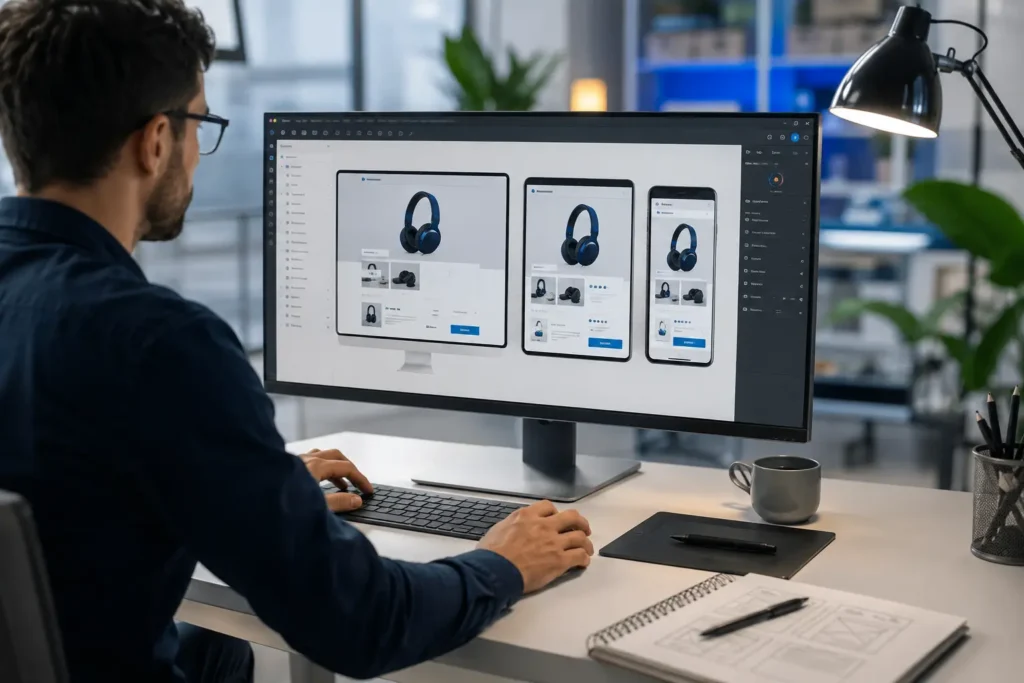
Figma Auto Layout + AI Plugins
Figma’s Auto Layout feature isn’t marketed as “AI,” but it’s the foundation most intelligent frame behavior in Figma builds on — it lets frames resize and reflow automatically as content changes. Layered on top of that, a growing ecosystem of AI plugins can generate entire frames from a text prompt or an existing component library.
For teams already living inside Figma, this is usually the lowest-friction entry point into intelligent frame creation, since it doesn’t require leaving the tool.
Real-world example: A common pattern on product teams is using Auto Layout to build a single reusable card component (image, title, price, button) once, with resizing rules built in. That one component then adapts automatically across dashboard widths, mobile app views, and marketing embeds — instead of a designer maintaining three or four separate versions by hand.
Framer AI
Framer takes the concept further by generating full website frames — layout, structure, and content placeholders — directly from a prompt or a rough description. It’s built for speed: going from idea to a workable frame in minutes rather than hours.
The trade-off is that Framer’s AI output tends to favor visually polished, template-like results, which works well for marketing sites and less well for highly custom or unconventional layouts.
Canva Magic Design
Canva’s Magic Design tool leans into accessibility over precision. Upload an image or describe what you need, and it generates a set of frame options — social posts, presentations, documents — almost instantly.
It’s less about pixel-perfect control and more about giving non-designers a fast, usable starting point.
Emerging No-Code Tools
Beyond the big three, a newer wave of tools — Uizard, Galileo AI, and Visily among them — are pushing intelligent frame creation further toward “describe it, get a working design.” These are especially popular with product teams and founders who need a UI mockup fast, without necessarily having a designer on hand yet.
Worth noting: this category moves quickly, and tool quality varies more here than with established players like Figma, Adobe XD, or Sketch.
Expert recommendation: For early-stage products without a dedicated designer, no-code AI mockup tools are best used to validate an idea internally or with early users — not as the final design system a company scales on. Plan to hand off to a proper design process once the product has real usage data.
Intelligent Frame Creation in Video & Animation
AI Frame Interpolation Explained
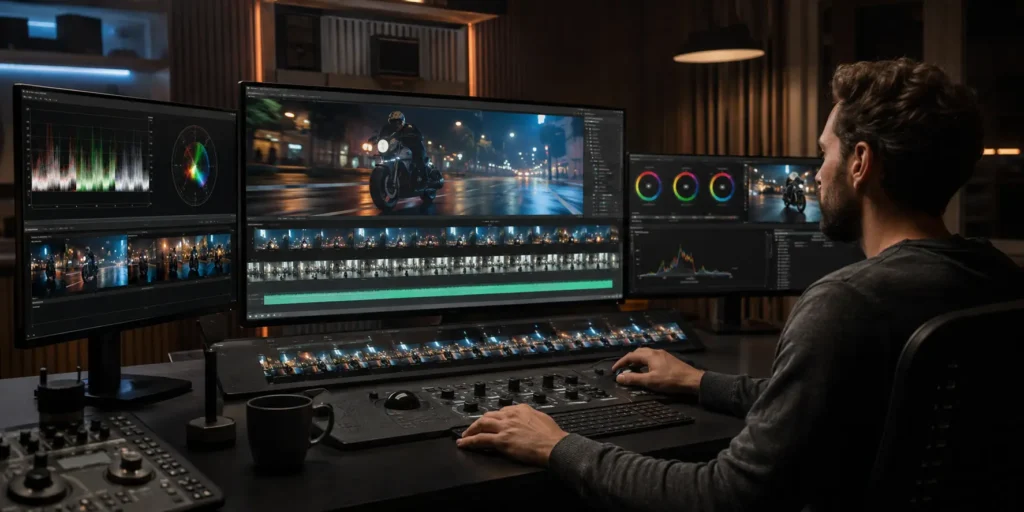
In video, frame interpolation is used to smooth motion, increase frame rate, or slow down footage without the choppy look that comes from simply stretching existing frames. The AI generates entirely new, plausible in-between frames rather than duplicating what’s already there.
This matters most in slow-motion effects, frame rate conversion (say, 24fps footage upscaled to 60fps), and restoring old or low-frame-rate footage.
Real-world example: A common editorial use case is converting archival or user-generated footage shot at a low frame rate into something usable alongside modern 60fps content — say, for a documentary or brand retrospective — without it looking visually out of place next to newer clips.
Keyframe Automation for Animators
Traditional animation relies on keyframes — the important poses or positions an animator sets manually, with the frames between them filled in afterward (a process traditionally called “in-betweening” or “tweening”).
Intelligent frame creation automates a version of this process. Given a start and end position, AI can generate believable in-between motion, cutting down significantly on manual tweening work — particularly useful for simpler motion graphics rather than complex character animation, where human judgment still tends to win out.
Tools to Know
A few names come up repeatedly in this space:
- RunwayML — widely used for AI video generation and frame-level editing
- Adobe Firefly Video — Adobe’s generative AI extension into video, integrated with Adobe Premiere Pro
- Luma AI — known for text-to-video and frame generation
- Kling AI — a newer entrant focused on high-fidelity video frame generation
Each has different strengths, and most are evolving quickly enough that it’s worth checking current capabilities rather than relying on last year’s comparisons.
Best Tools for Intelligent Frame Creation
Comparison Table
| Tool | Category | Best For | Pricing Model |
| Figma (Auto Layout + plugins) | Design/UI | Teams already using Figma | Freemium |
| Framer AI | Website design | Fast marketing site builds | Freemium |
| Canva Magic Design | General design | Non-designers, quick templates | Freemium |
| Uizard / Galileo AI | No-code UI | Early-stage product mockups | Freemium/Paid |
| RunwayML | Video | AI video generation and editing | Paid/Credits |
| Adobe Firefly Video | Video | Teams already in Adobe ecosystem | Subscription |
| Luma AI | Video | Text-to-video frame generation | Freemium/Paid |
Pricing and feature sets in this space change frequently — confirm current plans directly on each vendor’s site before making a purchasing decision.
Free vs. Paid Options
Most design-focused tools (Figma, Canva, Framer) offer functional free tiers, which makes them a reasonable starting point before committing to a paid plan. Video-focused AI tools tend to gate their better models and higher output quality behind paid credits or subscriptions, since video generation is more computationally expensive to run.
If you’re just testing whether intelligent frame creation fits your workflow, starting on a free tier is almost always the right call before paying for anything.
Alternatives to Consider
If none of the above fit, traditional tools like Adobe XD and Sketch remain viable for teams that prefer manual control over AI-assisted speed — a reasonable choice when brand precision matters more than turnaround time.
How to Choose the Right Tool for Your Workflow
A few practical questions narrow this down quickly:
- Are you designing screens or editing video? These are genuinely different tool categories — don’t expect one tool to do both well.
- Do you already have a design system or brand guidelines? If so, prioritize tools that let you import or enforce those constraints, rather than ones that only generate generic templates.
- How much manual review time can you afford? Faster, more automated tools generally require more cleanup afterward — it’s rarely a free lunch.
There’s no single “best” tool here — the right choice depends more on your existing workflow than on which tool has the flashiest demo.
Real Examples of Intelligent Frame Creation
Before-and-After: Manual vs. AI-Generated Frames

Picture a landing page hero section built by hand: a designer sets the headline size, positions the image, adjusts spacing, then repeats that process for tablet and mobile breakpoints — three separate passes, each checked individually.
Run the same content through an AI layout tool, and you typically get all three breakpoints generated at once, with spacing and hierarchy already roughly in place. The difference isn’t that the AI version is better-looking — often it isn’t, at least not yet. The difference is time. What took an hour by hand takes a few minutes, with the designer’s time shifting to refinement instead of construction.
Responsive Frame Adaptation Across Devices
A common test case: a product card with an image, a title, a price, and a button. On desktop, there’s room to lay these out side by side. On mobile, they need to stack.
A tool like Figma’s Auto Layout handles this reflow automatically once the constraints are set correctly — the card resizes and restacks without a designer manually rebuilding it for each screen size. The catch is that “correctly” is doing a lot of work in that sentence; badly configured constraints produce awkward, cramped results just as easily as good ones.
AI-Resized Ad Creative Across Platforms
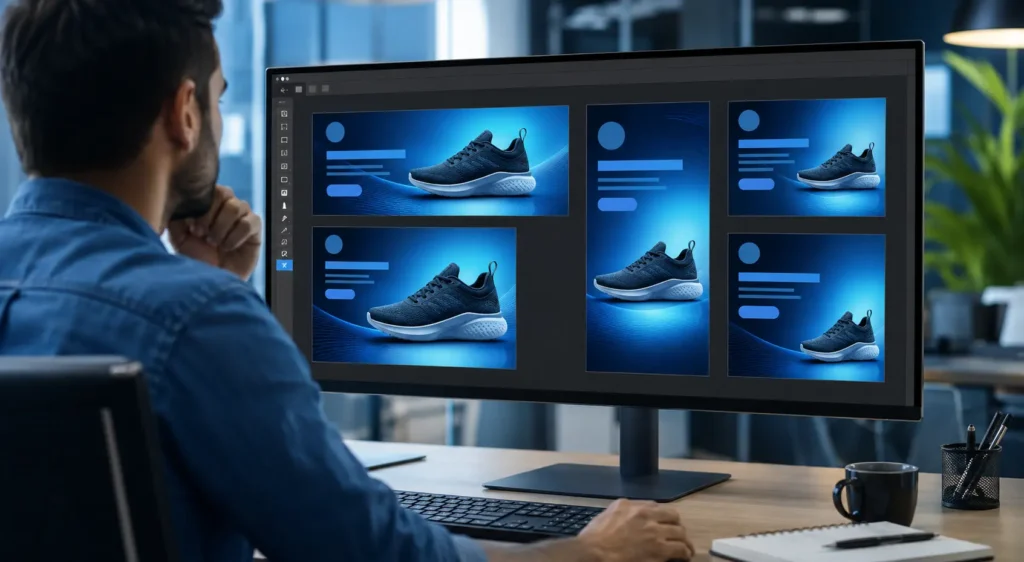
Marketing teams run the same campaign across Instagram (1:1 or 9:16), Google Display (multiple odd sizes), and Facebook (mixed ratios). Historically, this meant a designer manually rebuilding the same ad in six or seven dimensions.
AI-assisted frame tools can take one master creative and automatically generate the different aspect ratios, repositioning the logo, text, and product image to fit each format. It’s one of the more mature, low-risk use cases for intelligent frame creation, since the source material and output formats are usually well-defined in advance.
Case Study: Intelligent Frame Creation in Action
Note: this case study is a representative, composite scenario based on commonly reported workflow patterns from e-commerce and marketing teams — figures are illustrative rather than pulled from a single named company.
The Challenge — Manual Framing Bottleneck
Consider a mid-sized e-commerce team preparing seasonal ad creative. Every campaign needed roughly a dozen frame variations — different aspect ratios for different platforms, plus a few headline variants for A/B testing. With one designer handling this manually, a single campaign could take two to three full days before anything went live.
The Solution — Implementing AI Frame Tools
The team introduced an AI frame generation tool into the workflow, feeding it one master creative per product along with brand constraints (logo placement, color rules, font). The designer’s role shifted from building every variation to reviewing and refining the AI output — fixing awkward crops, adjusting a handful of layouts where text ran too tight against the edge.
The Results — Time Saved, Output Scaled, Consistency Gained
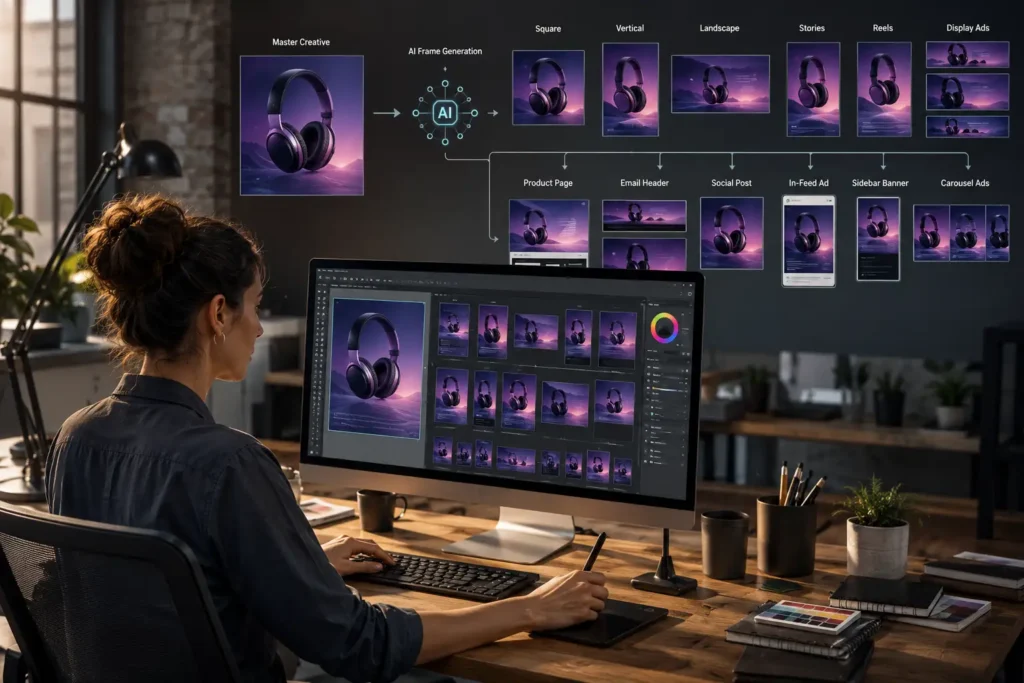
The same set of variations that used to take two to three days dropped to roughly half a day, most of it spent on review rather than construction. Because every variation started from the same automated base, spacing and brand consistency across formats actually improved — a side effect of removing manual, one-off adjustments that tend to drift over time.
Lessons Learned
Not everything came out clean. A handful of frames — particularly ones with longer product names — needed manual text resizing, since the AI consistently underestimated how much room longer copy would need. The team’s takeaway: AI frame tools are excellent at handling the bulk of repetitive variation work, but still need a human pass for edge cases involving unusually long text or unconventional product photography.
This lines up with a pattern seen across most real-world adoption — the tools remove the repetitive 80%, not the tricky 20%.
Expert Tips for Using Intelligent Frame Creation
How to Prompt or Configure AI Tools for Better Output
Vague input produces vague results. Being specific about spacing, hierarchy, and constraints — rather than just uploading raw content and hoping for the best — consistently produces cleaner first drafts. Where a tool allows reference images or existing brand frames as input, using them tends to anchor the output much closer to what you actually want.
QA Checklist Before Publishing AI-Generated Frames
A short review pass catches most issues before they become a problem:
- Check text isn’t clipped or overflowing at any breakpoint
- Confirm brand colors and fonts weren’t substituted or altered
- Verify important elements (CTAs, logos) weren’t pushed off-frame
- Test on an actual device or screen size, not just the preview
Combining AI Frames With Design System Rules
The tools that perform best long-term are the ones fed a defined design system upfront — spacing units, type scale, color tokens — rather than left to infer rules from scratch each time. Treat the AI as something that follows your system, not one that invents its own.
Troubleshooting Common Framing Errors
The most frequent issues tend to repeat: text overflow on longer copy, awkward cropping on non-standard image aspect ratios, and inconsistent spacing when multiple frame sizes are generated in a single batch. Most of these are fixable with tighter input constraints rather than abandoning the tool altogether.
Batch-Generating Frames Without Losing Quality
When generating many frames at once, spot-checking a sample rather than reviewing every single output is usually enough — but it’s worth deliberately including your longest text and largest image in that sample, since those are where problems concentrate.
Expert recommendation: Keep a running “known issues” note as you use any AI frame tool — the same two or three failure patterns tend to repeat across a given tool. A quick reference list turns your QA pass from a full re-check into a targeted one, cutting review time significantly over repeated use.
Benefits and Limitations
Key Benefits
- Speed — first-draft frames in minutes instead of hours
- Consistency — less drift across variations since they share an automated base
- Scalability — generating dozens of format variations becomes practical rather than exhausting
Known Limitations
- Accuracy on edge cases — long text, unusual aspect ratios, and non-standard content still trip up most tools
- Limited creative nuance — AI-generated frames tend toward safe, template-like choices rather than distinctive design decisions
- Dependence on input quality — messy or inconsistent source material produces messy, inconsistent output
When to Rely on AI vs. When to Use a Human Designer
As a rough rule: the more repetitive and format-driven the task (resizing, batch variations, responsive reflow), the more AI frame creation earns its keep. The more the task depends on original creative direction — a distinctive brand identity, a genuinely novel layout — the more a human designer’s judgment still matters more than automation.
Important Considerations Before Adopting Intelligent Frame Creation
Accessibility
Auto-generated frames don’t automatically account for screen reader compatibility or WCAG (Web Content Accessibility Guidelines) contrast requirements. Automated spacing and resizing can also break reading order or focus flow in ways that aren’t obvious from a visual preview alone — this needs a manual accessibility check, not just a visual one.
Performance and Core Web Vitals Impact
For web frames specifically, auto-generated layouts can introduce unnecessary DOM complexity or oversized assets if not reviewed by a developer, which affects load speed and Core Web Vitals scores — the metrics Google uses to measure real-world page experience. Speed gained in design doesn’t always translate to speed gained on the live page.
Data Privacy and IP Considerations
Because these tools are trained on large datasets of existing designs, questions around who owns AI-generated output — and whether training data included copyrighted work — remain unsettled in parts of the industry. Worth checking a given tool’s terms of service before relying on it for client or commercial work.
Localization
Text length varies dramatically across languages — German and Finnish text, for example, often runs significantly longer than English for the same meaning. AI frame tools trained primarily on English content can misjudge spacing when localized copy is dropped in, so localized frames typically need an extra review pass.
Developer Handoff
An AI-generated frame that looks correct in a design tool doesn’t always translate cleanly into code. Spacing values, component structure, and naming conventions from an AI tool often need to be reconciled with a team’s existing codebase rather than copied over directly.
Cost and ROI of Intelligent Frame Creation
Typical Pricing Models
Design-focused tools generally follow a freemium model — free for basic use, paid tiers unlocking higher limits or advanced AI features. Video-focused tools more often use credit-based or subscription pricing, since video generation costs significantly more computing power to run.
Estimating Time Saved vs. Tool Cost
A simple way to think about ROI: if a task that used to take a day now takes two hours, and the tool costs less than the value of that recovered time, it pays for itself quickly — particularly for teams producing high volumes of similar-format content (ads, social templates, product pages).
Is It Worth It for Small Teams vs. Enterprises?
Small teams often benefit most from free or low-cost tiers, since the bar for “worth it” is lower when there’s no dedicated designer to begin with. Enterprises tend to see ROI through volume and consistency at scale, but usually need to pair the tool with governance — brand guidelines, review workflows — to avoid inconsistent output across many teams using it independently.
The Future of Intelligent Frame Creation

Multimodal AI
The current split between “design frame tools” and “video frame tools” is likely to blur. Multimodal models capable of handling text, image, and video generation together point toward a future where one tool could generate a static frame and its animated version from the same input.
Predictions for 2026–2028
Expect tighter integration between AI frame tools and existing design systems, rather than AI tools operating as standalone generators. The trend so far has been AI features embedding directly into tools people already use — Figma, Adobe products — rather than replacing them with entirely new platforms.
What Practitioners Are Saying
Designers who’ve adopted these tools tend to describe them less as a replacement and more as a faster starting point — something to edit rather than something to trust outright. Video editors report similar sentiment around frame interpolation: useful for smoothing and scaling footage, but still requiring a manual pass on anything with complex or unpredictable motion.
Glossary of Key Terms
- Auto Layout — Figma’s content-aware system for automatically resizing and reflowing frames
- Frame interpolation — AI-generated frames inserted between two existing video frames to smooth motion
- Diffusion model — a generative AI model type that builds an output by refining noise into a structured result
- GAN (Generative Adversarial Network) — a model architecture where two networks compete to produce realistic outputs
- Optical flow — an algorithm that tracks pixel movement between video frames
- Design token — a stored, reusable design value (color, spacing, type) used to keep AI and manual output consistent
- Core Web Vitals — Google’s metrics for measuring real-world page loading and interaction performance
- WCAG — the Web Content Accessibility Guidelines, the standard for accessible digital content
Frequently Asked Questions
Intelligent frame creation is the use of AI and machine learning to automatically generate or adjust frames — design layouts, UI screens, or video keyframes — based on content and context, rather than manual placement. It shows up in design tools like Figma and Framer, and in video tools that handle frame interpolation and keyframe automation.
AI design tools analyze the content going into a frame — text length, image dimensions, existing design system rules — and use models like neural networks and diffusion models to predict a layout that fits. Features like Figma’s Auto Layout use content-aware logic to reflow elements automatically, while tools like Framer AI and Canva’s Magic Design generate frames from a prompt or a rough starting point.
On the design side, the main options are Figma (Auto Layout plus AI plugins), Framer AI, Canva Magic Design, and newer no-code tools like Uizard and Galileo AI. On the video side, RunwayML, Adobe Firefly Video, Luma AI, and Kling AI are the tools most commonly used for AI frame interpolation and keyframe generation.
Not inherently — it’s faster, not necessarily better. AI-generated frames are strong for repetitive, format-driven work like responsive resizing or batch ad variations, where speed and consistency matter most. Manual design still tends to win on original creative direction and brand nuance, which is why most real-world workflows use AI as a fast first draft rather than a final product.
Accuracy depends heavily on input quality. Well-structured content with clear constraints tends to produce clean, usable frames. Long or unpredictable text and non-standard images are where most tools still struggle, which is why a manual review pass remains standard practice.
Yes — Auto Layout is Figma’s built-in content-aware layout system, and it’s the foundation most AI plugin-based frame generation in Figma builds on. It’s one of the more accessible entry points into intelligent frame creation for teams already working in Figma.
Conclusion
Intelligent frame creation isn’t one single technology — it’s a shared idea, prediction instead of manual placement, applied across two different fields. In design and UI work, it shows up as auto layout, content-aware resizing, and AI-generated mockups in tools like Figma, Framer, and Canva. In video and animation, it shows up as frame interpolation and keyframe automation, powered by tools like RunwayML and Adobe’s generative video features.
What ties both together is the same practical trade-off: speed and consistency in exchange for a loss of fine creative control, especially on edge cases. The teams getting the most out of these tools aren’t treating AI as a replacement for human judgment — they’re treating it as a fast, reasonably reliable first draft that still needs a review pass before anything ships.
If you’re weighing whether to bring intelligent frame creation into your own workflow, start small. Test a free tier against a real, low-stakes project — a batch of ad resizes, a rough UI mockup, a short interpolation test — before committing budget or rebuilding a process around it. The technology is genuinely useful today, but it’s still evolving quickly enough that the right tool six months from now may not be the one that makes the most sense today.

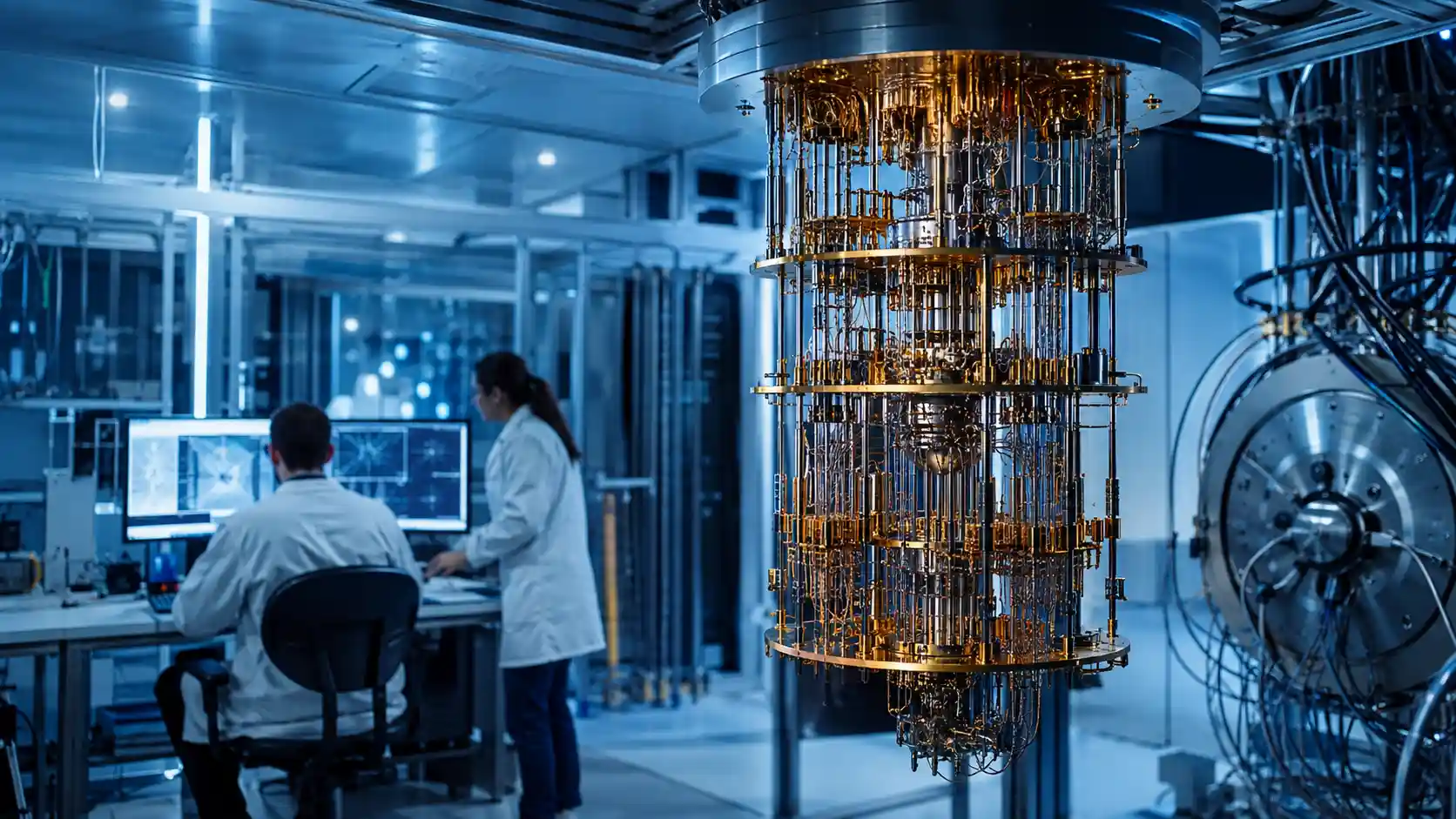
For decades, the latest breakthroughs in quantum computing 2024 had a noise problem — literally. Every time researchers added more qubits to a system, hoping to build more powerful machines, the errors got worse instead of better. It was the wall that kept quantum computing a laboratory curiosity rather than a real technology.
Then, in December 2024, Google’s Quantum AI team announced a chip called Willow that broke through that wall. In a controlled benchmark, it completed a calculation in about five minutes that would take today’s fastest classical supercomputers longer than the age of the universe to finish. The announcement drew reactions from across the tech industry — including a one-word “Wow” from Elon Musk and congratulations from Sam Altman on CEO Sundar Pichai’s announcement post — and it wasn’t the only major development of the year. Microsoft, IBM, and Quantinuum all made headlines with their own hardware advances, while banks, biotech firms, and government agencies quietly ran their own quantum pilots in the background.
But here’s the part most coverage skips: not everyone agrees on what these breakthroughs actually mean. Respected security researchers and industry analysts spent much of 2024 pushing back on the hype, arguing that real, usable quantum computing is still further away than press releases suggest — and that at least one of the year’s biggest claims remains scientifically disputed.
Whether you’re reading this to track the technology out of general interest, to assess business risk, or to plan a security roadmap, this article covers what actually happened in quantum computing in 2024: the hardware, the science behind it, real-world case studies from biotech and finance, and — unlike most recaps — the credible skepticism that came with it.
Key Takeaways
- Google’s Willow chip achieved “below-threshold” error correction — a peer-reviewed, Nature-published result showing that scaling up a quantum system can reduce errors instead of increasing them.
- Microsoft’s Majorana 1 claims a breakthrough topological qubit, but independent physicists say the underlying data doesn’t yet confirm the claim.
- Real institutions are already piloting quantum computing: JPMorgan, HSBC, Wells Fargo, Mastercard, and IBM/Moderna all ran named 2024 pilots — none in full production yet.
- NIST finalized post-quantum cryptography standards in August 2024, making encryption migration a near-term business priority, not a future one.
- Credible skeptics (Bruce Schneier, Forrester Research) and credible optimists (BCG, QuSecure’s Skip Sanzeri) genuinely disagree on the pace of progress — both perspectives are covered below.
- Realistic fault-tolerance timelines cluster around 2029–2033, according to independent analyst estimates.
What Actually Happened in Quantum Computing in 2024
If you only have a minute, here’s what mattered most in 2024:
- Google’s Willow chip achieved “below-threshold” error correction — the first time adding more qubits reduced errors instead of increasing them.
- Microsoft’s Majorana 1 introduced a new type of qubit based on topological particles, though the underlying science remains debated.
- IBM’s Heron processor improved gate fidelity and expanded cloud access through Qiskit.
- IBM and Moderna ran a record-scale quantum-classical simulation of mRNA structures, while JPMorgan, HSBC, and Wells Fargo ran parallel pilots in finance.
- NIST finalized post-quantum cryptography standards, making quantum-resistant encryption a near-term business priority rather than a future concern.
Why 2024 Is Being Called a Turning Point, Not Just Another Announcement Year
Quantum computing has had “breakthrough” years before, and some of those claims didn’t hold up well under scrutiny. What sets 2024 apart is peer review. Willow’s error correction result was published in Nature, giving independent scientists the ability to examine the methodology rather than take a company’s word for it.
A Brief History: Why 2024 Didn’t Come Out of Nowhere
Quantum computing as a serious engineering pursuit dates back to theoretical proposals in the early 1980s, but it stayed largely academic for decades. Google’s 2019 “quantum supremacy” claim — using a chip called Sycamore to complete a narrow benchmark faster than a classical supercomputer — was the field’s first major mainstream headline moment, and it was also controversial, with IBM publicly disputing how large Google’s classical-computing advantage actually was.
That controversy is exactly why Willow’s 2024 result landed differently. It wasn’t just a bigger number — it was a peer-reviewed answer to the specific technical objection (rising errors at scale) that had made every prior claim, including Google’s own 2019 one, easier to argue with.
Google’s Willow Chip: The Error Correction Breakthrough
What Willow Is
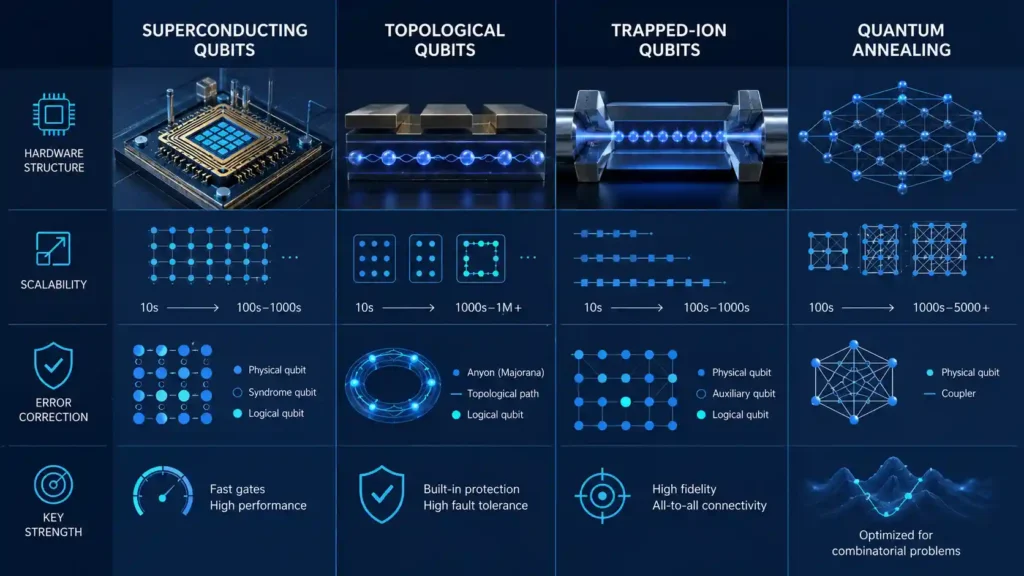
Willow is a 105-qubit superconducting quantum chip, developed at Google Quantum AI’s dedicated fabrication facility in Santa Barbara, California. Superconducting qubits are one of several competing hardware approaches in quantum computing — alongside trapped-ion and topological designs — and they work by cooling circuits to near absolute zero so that electrical currents behave according to quantum mechanical rules rather than classical ones.
What made Willow historically significant wasn’t simply that it had more qubits than earlier chips. It was what happened as researchers scaled the system up.
What “Below-Threshold” Error Correction Means

Below-threshold error correction is the point at which scaling up a quantum system reduces its overall error rate instead of increasing it. For years, the opposite was true: qubits are extremely fragile, and even tiny amounts of heat, vibration, or electromagnetic interference can corrupt a calculation. Error correction schemes group multiple physical qubits into a single, more reliable “logical qubit” that can detect and fix mistakes as it works — but historically, building a bigger logical qubit out of more physical qubits also introduced more chances for something to go wrong, so errors climbed right along with qubit count.
Willow reversed that relationship. As Google’s researchers increased the size of their error-correcting qubit grids, the error rate went down — reportedly falling by roughly half with every increase in grid size. That’s the result physicists had been chasing since error correction theory was first developed in the 1990s.
The Random Circuit Sampling Benchmark — and Its Real Limitations

To demonstrate Willow’s capabilities, Google ran a stress test called random circuit sampling — a computational task designed to be extremely difficult for classical computers to replicate. Willow completed it in about five minutes; Google estimated a classical machine would need longer than the universe has existed to do the same.
It’s a striking result, but here’s the caveat many recaps leave out: random circuit sampling doesn’t solve any real-world problem. It’s a benchmark built to prove a computational point, not a tool for drug discovery, logistics, or climate modeling. Willow’s real significance is architectural — it shows that the engineering path toward large-scale, error-corrected quantum computing is achievable, not just theoretical.
Hartmut Neven’s “Break-Even Point” Quote
Hartmut Neven, who founded Google Quantum AI in 2012, summed up the milestone by saying the field is “past the break-even point.” Coming from someone who has led the program since its founding, the framing carries weight — it’s a research leader’s technical assessment, not marketing language.
Why Peer Review Changes the Credibility Calculus
Google didn’t just announce Willow through a corporate blog post. The technical details went through peer review and were published in Nature — one of the most rigorously vetted scientific journals in the world. Given that earlier quantum supremacy claims, including Google’s own 2019 announcement, drew legitimate criticism over methodology, having the underlying data available for outside scrutiny is a meaningful credibility signal, not a formality.
Microsoft’s Majorana 1: The Most Disputed Breakthrough of the Year
What a Topological Qubit Is
A topological qubit encodes quantum information in the structural arrangement of exotic particles rather than in a single fragile physical state, making it inherently more resistant to environmental noise. While Google pursued superconducting qubits, Microsoft spent nearly two decades betting on this fundamentally different and far riskier approach. The theoretical payoff is significant: in principle, topological qubits could need far fewer physical qubits to build one reliable logical qubit — a major advantage for scaling, if the physics holds up.

How the Topoconductor Material Works
Microsoft’s chip, called Majorana 1, is built around a new material the company calls a “topoconductor,” constructed atom-by-atom from indium arsenide and aluminum. The goal is to create the conditions needed to observe and control Majorana particles — a type of quasiparticle predicted decades ago in theoretical physics — and use them as the basis for topological qubits.
The Scaling Promise
Microsoft has framed Majorana 1 as the foundation of a “Topological Core” architecture the company says could eventually scale to a million qubits on a single chip — an ambitious claim, since most competing hardware roadmaps discuss scaling in the thousands or tens of thousands over a similar timeframe.
The Controversy: What Independent Reviewers Say Is Still Unconfirmed
Here’s the part a lot of coverage glosses over: independent physicists have noted that Microsoft’s published data doesn’t fully confirm the particles behind the chip are truly topological in the way the company claims. This isn’t a fringe objection. Topological quantum computing has a history of earlier claimed detections that didn’t hold up under further scrutiny — including a widely publicized 2018 Microsoft-linked claim that was later retracted — which is exactly why scientists are being cautious this time.
None of this makes Majorana 1 a failure. It’s a promising, scientifically serious direction that hasn’t yet cleared the same independent-verification bar that Willow’s Nature publication did. Treating it as settled science would be premature; treating it as worth watching closely is fair.
IBM, Quantinuum, and the Rest of the 2024 Hardware Race
Google and Microsoft dominated headlines, but 2024 was a genuinely multi-company year for quantum hardware progress.
IBM’s Heron Processor and the Qiskit Cloud Ecosystem
IBM’s contribution centered on steady, practical improvement rather than one dramatic announcement. Its Heron processors focused on boosting gate fidelity — making each individual quantum operation more accurate — while IBM expanded broad cloud access to its hardware through Qiskit, its open-source quantum software framework. Qiskit has become one of the more common entry points for developers who want to experiment with real quantum hardware rather than simulations alone.
Quantinuum’s Topological Qubit Experiment with Harvard and Caltech
In a less publicized but scientifically noteworthy result, Quantinuum worked with researchers from Harvard and Caltech on its H2 trapped-ion system to demonstrate one of the first convincing experimental realizations of topological qubit behavior. The team used three-level quantum systems called qutrits to carry out operations matching long-standing theoretical predictions. The experiment was small in scale, but it lends independent support to the idea that topological designs generally — including, potentially, Microsoft’s approach — could eventually encode logical qubits using far fewer physical resources than today’s standard error-correction methods.
Rigetti, D-Wave, and the Near-Term Access Players
Rigetti Computing focused its Aspen line and cloud platform on giving researchers and businesses near-term access to run algorithms on real quantum hardware today, rather than optimizing purely for long-term scaling claims. D-Wave Systems, a pioneer of a different hardware approach called quantum annealing — specialized for optimization problems rather than general-purpose computing — continued expanding commercial partnerships in 2024, including the Mastercard loyalty-program pilot covered later in this article.
Other Players to Watch
The “big three” of Google, IBM, and Microsoft understandably get most of the attention, but they’re far from the only companies advancing the field. IonQ and Quantinuum continue pushing trapped-ion architectures. PsiQuantum is pursuing a photonics-based approach aimed at fault tolerance, a path also being explored by Xanadu, another photonic quantum computing company. Atom Computing, QuEra, and Pasqal are developing neutral-atom quantum computers — a hardware category with different scalability trade-offs than superconducting or trapped-ion systems.
The Geopolitical Backdrop
It’s also worth noting that quantum computing isn’t purely a private-sector race. The United States, China, and the European Union (through initiatives like the EU Quantum Flagship) have all treated quantum computing as a national strategic priority, funding domestic research programs alongside — and sometimes ahead of — corporate investment. That national-security dimension is part of why post-quantum cryptography standards, covered later in this article, have moved so quickly from proposal to government mandate.
From Lab to Industry: Real-World Quantum Applications in 2024
Better chips only matter if someone can actually use them. 2024 was the year quantum computing started showing up in real industry pilots rather than just physics papers — and finance turned out to be one of the busiest proving grounds.
Quantum Machine Learning
Quantum machine learning continued to grow throughout 2024, primarily in research settings exploring how quantum circuits can process data in ways classical machine learning can’t. According to Forrester Research, teams are actively developing quantum neural networks and quantum support vector machines, alongside algorithms like the Quantum Approximate Optimization Algorithm (QAOA), which can be paired with techniques like gradient descent to potentially speed up model training. It’s early-stage work, but it’s a meaningful growth area as classical machine learning runs into its own computational cost limits.
Real-World Example: How Wall Street Used Quantum Computing in 2024
Finance moved fastest from theory to pilot in 2024. The specifics matter because they show what “quantum computing in business” actually looks like today: narrow, hybrid, and experimental — not a wholesale replacement of existing systems.

- JPMorgan Chase, working with AWS and Caltech researchers, published a 2024 study introducing a hybrid quantum-classical method that breaks large portfolio optimization problems into smaller subproblems — a practical workaround for current hardware’s scale limits. JPMorgan has also built a dedicated Global Technology Applied Research unit specifically to explore quantum algorithms for finance.
- HSBC announced in September 2024 that it had successfully trialed quantum-secure technology to protect its platform for trading tokenized physical gold, using Quantinuum’s quantum randomness technology to guard against “store now, decrypt later” attacks.
- Wells Fargo worked with IBM to develop nearly a dozen experimental quantum algorithms for financial use cases.
- Mastercard partnered with D-Wave to test whether quantum annealing could optimize its loyalty rewards program.
None of these institutions have moved quantum algorithms into full production — an important, honest caveat. But the pattern is consistent: large, risk-averse financial institutions with a lot to lose are treating quantum computing as worth real budget and real technical staff today, not as a distant curiosity.
Quantum-as-a-Service (QaaS)
One of the more practically important 2024 shifts had nothing to do with a specific chip. Quantum-as-a-Service — cloud-based access to real quantum hardware — expanded significantly, and Forrester credited it with enabling broader quantum machine learning experimentation. For most businesses and researchers, owning a quantum computer isn’t realistic or necessary; renting time through a cloud platform is. That’s exactly how JPMorgan, Wells Fargo, and Mastercard ran their pilots without owning quantum hardware themselves.
NVIDIA’s Hybrid Quantum-GPU Vision
Even companies outside the traditional quantum computing space took notice in 2024. NVIDIA’s CEO has said that connecting quantum computers directly to classical GPU supercomputers is becoming essential to the industry’s roadmap — a sign the two technologies are increasingly viewed as complementary, with GPUs handling classical computation and quantum hardware tackling the narrow problems it’s naturally suited for.
Quantum Computing Market Signals
Beyond the science, there’s a useful business signal easy to miss elsewhere: according to data reported by Resonance, 37 full quantum computers were sold in 2024, worth a combined $854 million — more than double the units sold three years earlier. Combined with the finance-sector pilots above, that growth trend suggests quantum hardware is moving, gradually, from research curiosity toward a genuine commercial market.
Case Study: IBM and Moderna’s Quantum-Classical mRNA Simulation
Most quantum computing coverage mentions this project in a single sentence. It deserves more, because it’s one of the clearest examples of quantum hardware being pointed at a real industry problem in 2024, rather than a benchmark built purely to impress.

The Problem
mRNA molecules fold into complex three-dimensional shapes, and predicting how a given sequence folds is central to designing effective mRNA-based medicines — the same technology behind Moderna’s vaccine platform. Molecules behave according to quantum mechanics themselves, which makes simulating them accurately exactly the kind of task classical computers handle inefficiently. As sequence length grows, the computational cost of an accurate classical simulation increases dramatically, creating a practical ceiling on what researchers can model.
The Method
In 2024, IBM and Moderna tested a hybrid quantum-classical approach aimed at this bottleneck. Rather than replacing classical computing entirely, the project used quantum processors for the parts of the calculation where quantum systems have a natural advantage, while classical hardware handled the rest. The collaboration reached a record scale for this type of work: simulations involving up to 80 qubits and mRNA sequences of 60 nucleotides.
The Result
That 80-qubit, 60-nucleotide benchmark is meaningfully larger than earlier attempts at quantum-assisted molecular simulation. It demonstrates that hybrid quantum-classical workflows can be applied to real biotech research questions today — an active area of experimentation with a named pharmaceutical partner, not a future promise.
The Limitation
It’s worth being direct about what this project was not. It wasn’t a finished drug discovery tool, and it didn’t replace Moderna’s existing computational pipeline. Sixty nucleotides is a research-scale sequence, well short of the length and complexity needed for many real-world mRNA therapeutic candidates. The value lies in proving the approach works at growing scale, not in delivering an immediately deployable product.
What This Signals About Near-Term Quantum Value
This case study — and the finance pilots above — are a better guide to near-term quantum value than any chip announcement. Quantum simulation of molecules, materials, and chemical systems remains one of the clearest near-term paths toward genuine quantum advantage, because it aligns with what quantum hardware is naturally built to calculate. Expect more announcements like this one — narrow, hybrid, incremental — before quantum computers replace classical drug discovery pipelines or trading desks outright.
Post-Quantum Cryptography: The Security Story Behind the Headlines
What NIST Finalized in August 2024
In August 2024, NIST finalized its first official set of post-quantum cryptography (PQC) standards — encryption algorithms designed to remain secure even against an attack from a sufficiently powerful quantum computer. This is arguably the most consequential 2024 development for ordinary businesses, and it’s routinely underplayed in favor of flashier hardware stories. Governments worldwide have begun mandating PQC adoption, treating the quantum threat to encryption as a near-term engineering reality rather than a distant hypothetical.
“Harvest Now, Decrypt Later”
“Harvest now, decrypt later” describes attackers intercepting and storing encrypted data today, with the intent to decrypt it once quantum computers become powerful enough to break current encryption. You don’t need a working, large-scale quantum computer to already be at risk — the security clock started ticking before any such machine exists. HSBC’s September 2024 gold-token trial, mentioned above, was designed specifically to close this exact gap.

Which Industries Need to Migrate Now
The organizations most exposed are those holding long-lived sensitive data — information that needs to stay confidential for five, ten, or twenty years. That includes healthcare records, financial data, government and defense communications, legal records, and intellectual property. If your data needs to stay private for years, waiting until quantum computers “actually arrive” to migrate is already too late for that data.
Expert Perspective on the Real Urgency Timeline
Security experts don’t fully agree on how urgent this is, which is useful context in itself. Roger Grimes, author of Cryptography Apocalypse, has acknowledged that practical, large-scale quantum decryption capability is still a real technical hurdle rather than an imminent event. Skip Sanzeri, co-founder and COO of quantum-safe security company QuSecure, has pointed to 2024’s fundamental breakthroughs as reason to expect sustained — potentially increased — investment in quantum-safe security through 2025 and beyond.
Practical takeaway: the sky isn’t falling, but for any organization with long-lived sensitive data, a post-quantum migration assessment is a reasonable project to start now, not a future to-do. It’s also worth understanding related but distinct terms you’ll encounter in this space: quantum-resistant algorithms (the mathematical techniques NIST standardized), and quantum key distribution (QKD), a separate hardware-based method — used in HSBC’s pilot — that relies on the laws of quantum physics to detect eavesdropping on a communication channel, forming part of what’s sometimes called the emerging quantum internet or quantum networking infrastructure.
Hype vs. Reality: What the Skeptics Are Saying
Most recaps of 2024 read like a highlight reel. That’s a disservice to readers, because some of the field’s most credible voices spent the year pushing back — and their skepticism deserves equal space.
Bruce Schneier’s Case for Caution
Bruce Schneier, one of the most respected voices in cryptography and security research, has been publicly skeptical of near-term quantum computing progress since at least 2019. His argument isn’t that quantum computing is fake — it’s that the field doesn’t yet know whether building a truly useful quantum computer is merely difficult, or difficult on a scale closer to a decades-away moonshot. He’s also raised a subtler concern: that the rush to adopt post-quantum cryptography, driven partly by hype, carries its own risk if organizations migrate to new algorithms before those algorithms have been thoroughly battle-tested.
Forrester’s 2024 Verdict
Forrester Research’s analysis struck a similarly measured tone, concluding that quantum computing “remains experimental” despite the year’s genuine advances. Their analysts pointed to persistent high error rates and scalability challenges as reasons practical, everyday quantum computing is still further off than some coverage implies — even while acknowledging real promise in optimization, simulation, and machine learning for industries like finance and pharmaceuticals, exactly the pattern seen in the JPMorgan and IBM-Moderna examples above.
The Counterargument
Not every analyst reads the moment the same way. Sanzeri’s view — that 2024’s breakthroughs were fundamental enough to justify continued, possibly increased, investment — is a genuinely different read on the same facts. Grimes offers a more nuanced middle position: that the recent cooling in quantum investment has less to do with quantum computing failing to deliver, and more to do with capital and attention shifting toward the AI boom happening at the same time.
How This Debate Echoes Past Quantum Winters
This isn’t the first time quantum computing has generated a wave of optimism. The field has cycled through excitement and quieter periods before — including the disputed 2018 topological qubit claim mentioned earlier — which is exactly why scientists are cautious about Majorana 1 until independent verification catches up. What’s different about 2024, proponents argue, is that the central result, Willow’s below-threshold error correction, cleared a peer-reviewed bar earlier hype cycles didn’t.
A Realistic Value Forecast
For a sense of the long-term commercial stakes, the Boston Consulting Group projected in 2024 that quantum computing could generate between $450 billion and $850 billion in value by 2040. BCG’s analysts framed near-term obstacles as challenges to work through rather than threats to the technology’s long-term trajectory — an optimistic long-range view that still leaves room for the shorter-term caution voiced by Schneier and Forrester.
Quantum Computing Explained: Key Terms You Need to Know
Qubit vs. Physical Qubit vs. Logical Qubit
A classical bit is either a 0 or a 1. A qubit can represent 0, 1, or a combination of both simultaneously, a property called superposition. A physical qubit is a single hardware unit on a chip — fragile and error-prone on its own. A logical qubit is built by combining multiple physical qubits using error correction, creating a more reliable unit capable of detecting and fixing its own mistakes. The ratio of physical to logical qubits is one of the most important — and most often glossed over — numbers in any quantum computing announcement.
Quantum Supremacy vs. Quantum Advantage
Quantum supremacy means a quantum computer performed a calculation no classical computer could feasibly complete, regardless of practical use — as with Willow’s random circuit sampling benchmark. The quantum advantage means a quantum computer solved a genuinely useful, real-world problem faster or better than the best available classical method. As of 2024, the field has demonstrated supremacy several times over; a clear, widely accepted case of practical quantum advantage — the kind JPMorgan and Wells Fargo are actively hunting for — is still a milestone yet to come.
Superposition, Entanglement, and Decoherence
Superposition lets a qubit hold multiple states at once instead of being locked into a single value. Entanglement links two or more qubits so the state of one instantly correlates with the state of another, even when separated — a resource quantum algorithms rely on to explore many possibilities in parallel. Decoherence is the process by which a qubit loses its delicate quantum state due to outside interference like heat or vibration — the root cause of the error problem the field has fought for decades.
NISQ Era vs. Fault-Tolerant Quantum Computing
NISQ (“Noisy Intermediate-Scale Quantum”) describes the current generation of quantum hardware: enough qubits to be interesting, not enough error correction to run long, complex programs reliably. A fault-tolerant quantum computer is the long-term goal — a machine with enough logical qubits and low enough error rates to run substantial programs without errors accumulating and destroying the result. Willow’s below-threshold result is a meaningful step toward fault tolerance, but the industry as a whole — including every bank and biotech pilot described above — is still operating in the NISQ era.
2024 Quantum Chip Comparison Table
| Chip | Company | Qubit Type | Qubit Count | Key 2024 Result | Verification Status |
| Willow | Superconducting | 105 | Below-threshold error correction | Peer-reviewed (Nature) | |
| Majorana 1 | Microsoft | Topological | Not publicly specified at scale | New topoconductor material demonstrated | Disputed by independent reviewers |
| Heron | IBM | Superconducting | Varies by generation | Improved gate fidelity, expanded Qiskit access | Company-reported |
| H2 (topological experiment) | Quantinuum (with Harvard, Caltech) | Trapped-ion | Small-scale experimental | First convincing topological qubit behavior | Independently co-authored |
Which Approach Is Furthest Along Toward Fault Tolerance
Judged strictly by independent verification, Google’s superconducting approach is currently furthest along toward demonstrated fault tolerance, thanks to the Nature-published below-threshold result. Microsoft’s topological approach has the most ambitious long-term scaling story if the underlying physics holds up, but it’s the one still waiting on independent confirmation. Quantinuum’s trapped-ion experiment, while smaller in scale, offers some of the strongest early evidence that topological designs generally — not just Microsoft’s specific implementation — may eventually be viable.
Expert Recommendations: How to Make Sense of Quantum Computing News
Reading quantum computing headlines critically is its own skill. Here’s how the most credible coverage approaches it — and what to do with that approach yourself.
Check whether the claim is peer-reviewed or just a company blog post.
Willow’s credibility rests heavily on its Nature publication. Majorana 1’s more uncertain status is partly because its underlying data hasn’t cleared that same bar yet.
Ask what specific problem was actually solved.
A benchmark like random circuit sampling proves a computational point; it doesn’t mean a chip can currently run drug discovery or climate modeling.
Look for independent replication before trusting “world’s first” claims.
Topological qubits have a documented history of early claimed detections that didn’t hold up — including Microsoft’s own 2018 retraction. A single company’s announcement, however well-resourced, isn’t the same as outside labs confirming the result.
If you handle long-lived sensitive data, start a post-quantum migration assessment now.
You don’t need to wait for a working large-scale quantum computer to be at risk from harvest-now-decrypt-later attacks. NIST’s finalized standards give you a concrete framework to start from — HSBC’s 2024 gold-token pilot is a working example of what that looks like in practice.
Track qubit fidelity and error rates, not just qubit count.
A chip with fewer, more reliable qubits can outperform one with more, noisier qubits for real tasks. Raw qubit count is often the number companies lead with in marketing, but it’s rarely the number that matters most.
Follow what large, risk-averse institutions are actually funding, not just what they’re announcing.
JPMorgan’s dedicated quantum research unit and Wells Fargo’s algorithm work with IBM are stronger signals of genuine near-term value than any single press release, precisely because these institutions have strong incentives not to waste money on hype.
Try free-tier cloud access before trusting headlines alone.
IBM’s Qiskit, Amazon Braket, and Google Cloud all offer ways to run real (if small-scale) programs on actual quantum hardware, often for free.
What’s Next After 2024
Realistic Timeline Estimates for Fault-Tolerant Quantum Computing
Credible estimates for genuinely fault-tolerant, commercially useful quantum computers generally cluster around 2029–2033 — close enough that preparation, particularly around cryptography, genuinely matters, but far enough out that skepticism about near-term commercial claims remains reasonable.
What to Watch For Next
The most meaningful future signals won’t necessarily be qubit counts or dramatic benchmark comparisons. Watch instead for independent replication of Majorana 1’s topological claims, whether JPMorgan’s or Wells Fargo’s pilots move from research to production, expanded hybrid quantum-classical case studies beyond IBM and Moderna, and whether the industry produces its first widely accepted example of genuine quantum advantage.
Frequently Asked Questions
Most experts point to Google’s Willow chip achieving below-threshold quantum error correction — the first demonstration that adding more qubits can reduce errors instead of increasing them, published in the peer-reviewed journal Nature.
Willow demonstrated below-threshold error correction and completed a random circuit sampling benchmark in about five minutes — a calculation that would take a classical supercomputer far longer than the age of the universe. The benchmark has no direct practical application, but proves the underlying error-correction approach can scale.
Not fully. Independent physicists say Microsoft’s published data doesn’t yet fully confirm the particles behind the chip are truly topological. It remains a promising but scientifically unsettled claim.
In narrow cases, yes. JPMorgan, HSBC, Wells Fargo, and Mastercard all ran 2024 pilots targeting portfolio optimization, transaction security, and loyalty-program optimization; IBM and Moderna ran a parallel biotech pilot. None have reached full production, but all show real institutional investment beyond pure research.
Google, IBM, and Microsoft lead in mainstream attention, but Quantinuum, IonQ, Rigetti, D-Wave, PsiQuantum, Atom Computing, QuEra, and Pasqal are all active, credible players pursuing different hardware approaches.
Conclusion
2024 wasn’t the year quantum computing became commercially useful. It was the year the field’s single biggest technical objection — that scaling up a quantum system inevitably makes it less reliable — finally got resolved, in a peer-reviewed, independently examinable way. That’s genuinely significant, even if it’s a quieter, more technical story than the “five minutes versus the age of the universe” headlines suggest.
At the same time, real disagreement remains. Microsoft’s Majorana 1 claim hasn’t cleared independent verification. Forrester and Bruce Schneier are right to point out that practical, everyday quantum computing is still experimental. BCG’s optimistic long-term forecast and Sanzeri’s expectation of continued investment don’t cancel out the legitimate caution in Grimes’s and Schneier’s assessments — both can be true at once. The finance and biotech pilots covered here back that middle-ground reading up: JPMorgan, HSBC, Wells Fargo, Mastercard, and Moderna all treated quantum computing as worth serious investment in 2024, and every one of them also stopped short of moving it into production.
For most readers, the most useful action item isn’t waiting for a quantum computer to buy. It’s post-quantum cryptography readiness: if your organization holds sensitive data that needs to stay confidential for years, NIST’s finalized standards give you a concrete place to start a migration assessment today, the way HSBC already has. That’s the part of 2024’s quantum story that’s already relevant, whether or not you ever touch a qubit yourself.